

If you’re a small business owner, you’ve probably heard a lot about AI lately. It might sound like something only big tech companies can afford or use, but that’s no longer true.
AI is quietly reshaping how websites work, how customers interact with businesses, and how small brands compete online. The best part is you don’t need a massive budget or a technical team to start using it.
Let’s break down what’s actually happening and how you can take advantage of it today.
AI is Making Websites Smarter, Not Just Prettier
Before, a “good website” meant clean design, fast loading, and mobile responsiveness. Those still matter, but now there’s a new layer.
Websites are becoming smarter.
Instead of showing the same content to everyone, AI allows your website to adjust based on user behavior. It can recommend products, personalize messages, and guide visitors toward taking action.
Think of it like having a digital assistant that understands your customers while they browse.
For small businesses, this means you no longer have to guess what your visitors want. Your website can help you respond in real time.
Customer Support is Now Instant (Even Without Hiring More People)
One of the biggest changes AI brings is in customer support.
Before, answering inquiries meant being online all the time or hiring staff. Now, AI chatbots can handle common questions instantly. They can respond to FAQs, guide users through your services, and even help with bookings or purchases.
This is especially powerful for small businesses because it allows you to look responsive and professional without increasing your overhead.
More importantly, customers today expect fast replies. If they don’t get them, they leave.
AI helps you stay available even when you’re not.
Content Creation is Faster (But Still Needs Strategy)
AI tools can now help generate website content, from product descriptions to blog posts. This speeds up the process significantly, especially if you’re managing your site on your own.
But here’s the reality: AI is a tool, not a replacement for strategy.
You still need to guide the messaging. You still need to understand your audience. The businesses that win are the ones that combine AI efficiency with human insight.
For example, instead of writing everything from scratch, you can use AI to create a draft, then refine it to match your brand voice.
This saves time while keeping your content authentic.
SEO is Becoming More Competitive (And More Opportunity-Driven)
AI is also changing how search engines work. Platforms are getting better at understanding intent, not just keywords.
That means small businesses have a real opportunity.
You don’t need to compete by publishing hundreds of articles. You can focus on creating helpful, relevant content that directly answers your customers’ questions.
AI can help you:
- Generate topic ideas based on what people are searching
- Optimize your content structure
- Improve readability and clarity
If used correctly, AI can help you compete with bigger brands in search results.
Accessibility is Finally Getting the Attention It Deserves
This is something we care deeply about at CliqAlly.
AI is making it easier to build websites that are accessible to everyone, including people with disabilities. From automated image descriptions to voice navigation and smart contrast adjustments, AI can enhance usability in ways that were harder to implement before.
For small businesses, this is not just about compliance. It’s about reaching more people and creating a better experience for all users.
An accessible website is no longer optional. It’s becoming a standard.
Personalization is the New Competitive Advantage
Imagine a visitor landing on your website and seeing content that feels tailored specifically for them.
AI makes that possible.
It can track behavior such as pages visited, time spent, and actions taken, then adjust what the user sees. This could be showing relevant services, highlighting specific offers, or guiding them toward a decision.
For small businesses, this levels the playing field. You can now offer experiences that feel just as refined as larger companies.
How You Can Start Using AI Today
You don’t need to overhaul your entire website overnight. Start small and build from there.
Here are a few practical ways to begin:
First, add an AI chatbot to your website to handle basic inquiries. This alone can improve user experience significantly.
Second, use AI tools to help with content creation, whether it’s blog posts, landing pages, or product descriptions.
Third, explore AI-powered SEO tools to refine your content strategy and improve visibility.
Fourth, audit your website for accessibility and look for AI tools that can help enhance usability.
Finally, pay attention to your data. AI works best when you understand your users. Look at how visitors interact with your site and use that insight to improve.
Final Thoughts
AI is not here to replace small businesses. It’s here to empower them.
The gap between small and large companies is shrinking because tools are becoming more accessible. What matters now is how quickly you adapt and how intentionally you use these tools.
If you approach AI as a partner rather than a shortcut, it can help you create better websites, better experiences, and ultimately, better results.
And if you’re not sure where to start, that’s exactly where we come in.
At CliqAlly, we help businesses build smarter, more accessible websites that are ready for what’s next.
Get in touch with us today and let’s build a website that works as hard as you do.
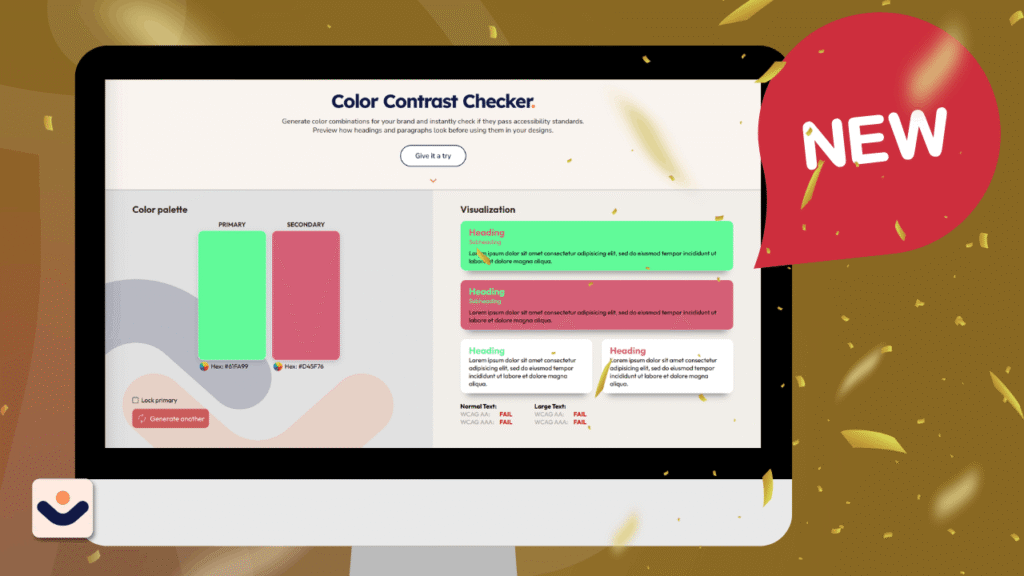
At CliqAlly, we believe every website should be usable by everyone. That’s why we created a simple yet powerful tool: the CliqAlly Contrast Checker—built to help designers, developers, and business owners ensure their color choices are readable, inclusive, and compliant.
Why Color Contrast Matters
Color contrast plays a huge role in how users experience your website.
If your text blends into the background, users may struggle to read your content—especially those with visual impairments or color blindness. In fact, poor contrast is one of the most common accessibility issues found on websites.
According to WCAG guidelines:
- Normal text should have at least a 4.5:1 contrast ratio
- Large text should have at least a 3:1 contrast ratio
Failing to meet these standards doesn’t just affect accessibility—it can also impact user experience, engagement, and even conversions.
What is the CliqAlly Contrast Checker?
The CliqAlly Contrast Checker is a free online tool that lets you instantly test color combinations for accessibility.
Simply choose your text color and background color, and the tool will:
- Calculate the contrast ratio
- Show whether it passes or fails
- Evaluate both WCAG AA and AAA standards
- Provide results for normal text and large text
No complicated setup. No guesswork. Just clear results.
Built for Simplicity and Speed
Many contrast tools exist, but we focused on making ours:
- Beginner-friendly – anyone can use it, even non-designers
- Fast and intuitive – instant feedback as you adjust colors
- Practical – designed for real-world use during design and development
Instead of digging through guidelines or doing manual calculations, you get immediate answers—so you can make better design decisions faster.
Who Should Use This Tool?
The CliqAlly Contrast Checker is useful for:
Designers
Validate your color palettes before finalizing designs.
Developers
Ensure your UI meets accessibility standards during development.
Business Owners
Check if your website is readable and inclusive for all users.
Content Creators
Make sure your visuals and text are easy to consume across devices.
Why This Tool Matters for Inclusivity
Accessibility isn’t just a technical requirement—it’s a responsibility.
Millions of users experience low vision, color blindness, or other visual challenges. Proper contrast ensures they can:
- Read your content clearly
- Navigate your website
- Engage with your brand without barriers
Better contrast doesn’t just help users with disabilities—it improves readability for everyone, especially in bright environments or on mobile screens.
More Than Compliance—It’s Better UX
While meeting WCAG standards is important for legal compliance, the real value goes beyond that.
Good contrast leads to:
- Better readability
- Lower bounce rates
- Higher engagement
- Improved user trust
In short: accessible design is good design.
How to Use the CliqAlly Contrast Checker
Using the CliqAlly Contrast Checker is simple and interactive—you don’t need any technical knowledge to get started.
Here’s how you can make the most out of it:
1. Generate Your Colors
Start by generating two colors:
- Primary color (usually your text color)
- Secondary color (your background)
You can either manually pick colors or let the tool generate combinations for you instantly.
2. Preview in Real-Time
As soon as your colors are selected, you’ll see text samples in the visualization column.
This gives you a real-world preview of how your content will look—not just numbers, but actual readability.
3. Lock a Color You Like
Found a primary color you want to keep?
You can lock the primary color and continue generating different secondary colors. This is perfect if:
- You already have a brand color
- You want to explore safe background combinations
4. Generate Better Matches
Keep generating until you find a combination that looks good and passes accessibility standards.
This removes the guesswork and helps you discover combinations you might not have considered.
5. Check Accessibility Results
For every combination, the tool automatically shows:
- Pass or Fail
- WCAG AA and AAA compliance
- Results for both:
- Normal text
- Large text
Try It Yourself
Ready to test your colors? Visit the CliqAlly Contrast Checker and start building more accessible designs today.
Get in touch with us today and let’s build a website that works as hard as you do.
Creating a website that looks good is no longer enough. Businesses must also ensure their websites are inclusive and accessible to all users. At CliqAlly, we believe accessibility and SEO work hand in hand. An accessible website not only supports people with disabilities but also strengthens your search engine visibility and helps you connect with a broader audience.
Let’s explore how accessibility can improve your SEO and expand your reach online.
Better Structure = Better Crawlability
Search engines like Google rely on clear, semantic HTML to understand the content of a webpage. Many accessibility best practices—like using proper heading levels (<h1> to <h6>), descriptive alt text, and meaningful link text—also help search engines crawl and index your content more accurately.
Example:
Instead of using vague link text like “click here,” accessible websites use descriptive links like “Download our free web accessibility checklist.” This tells both users and search engines what the page is about.
If you’re new to the concept of accessibility, you may want to start with our previous post, Understanding Web Accessibility Standards: Why They Matter and What You Need to Know, which explains the foundational guidelines that support everything we cover in this article.
Alt Text Improves Image Indexing
Alternative (alt) text is a key accessibility feature for users who rely on screen readers. But it also plays an important role in SEO.
Alt text helps search engines understand what an image represents. This boosts your chances of appearing in Google Image Search and strengthens the relevance of your content overall.
Bonus Tip:
Use specific, keyword-relevant descriptions without keyword stuffing.
For example:
Bad Alt Text: “image1.png“
Good Alt Text: “Screenshot of ADA-compliant website with high color contrast“
Mobile-Friendly = Accessible-Friendly
Many accessibility features align closely with mobile optimization. For example, using flexible layouts allows content to adapt smoothly across screen sizes, while large tap targets and resizable text improve navigation for users on both mobile devices and assistive technologies.
These elements not only support individuals with disabilities but also create a better mobile experience for everyone.
Since Google prioritizes mobile-first indexing, websites that function well on mobile devices tend to rank higher in search results. By designing with accessibility in mind, you naturally enhance mobile usability, which directly contributes to better SEO performance.
Faster Load Times, Lower Bounce Rates
Web accessibility encourages efficient coding practices and optimized media. This leads to faster-loading websites, which both users and search engines love.
When users can quickly find and access the content they need—especially those using assistive technology—they’re more likely to stay longer. This reduces bounce rates and increases session durations, two signals that Google pays attention to.
Accessibility Expands Your Reach
According to the World Health Organization, over 1 billion people worldwide live with some form of disability. In the U.S. alone, that’s about 26% of adults. If your site isn’t accessible, you’re potentially excluding millions of users who could become loyal customers.
By embracing accessibility, you:
Reach a broader and more diverse audience
Show your brand values inclusivity
Create a more usable experience for everyone, including older users, mobile users, and people with temporary impairments (like a broken arm or eye strain)
Compliance Protects You, and Builds Trust
Inaccessible websites in the U.S. are increasingly facing lawsuits under the Americans with Disabilities Act (ADA). By making your website accessible, you:
Reduce legal risks
Build trust with users
Gain a competitive edge as a socially responsible business
And trust—both from users and search engines—translates to better rankings and more conversions.
Accessibility is not simply viewed as a checkbox; it is recognized as a powerful tool for SEO and business growth.
At CliqAlly, accessible websites are built for U.S.-based businesses to ensure strong search engine performance and broader audience reach.
Need help with your next website project? Get in touch with us and let’s make your site work for everyone.

When people hear “web accessibility,” they often think of it as something complicated, expensive, or only for people with disabilities. But here’s the truth: accessibility is for everyone—and it’s easier to integrate than most people think.
At CliqAlly, we’ve seen many misconceptions about accessible design, especially among business owners, web developers, and even designers. So, let’s bust some of the most common myths around web accessibility—once and for all.
Myth #1: “Accessibility only benefits people with disabilities.”
This is one of the biggest misconceptions. While accessibility does directly support people with visual, auditory, motor, or cognitive disabilities, its benefits go way beyond that.
Think about:
A parent holding a baby with one hand, navigating a website with the other.
Someone using voice control while driving.
A person with slow internet needing a fast-loading, clean site.
Accessibility helps everyone, in different situations—whether temporary, situational, or permanent.
Myth #2: “Making a website accessible is expensive and time-consuming.”
We totally get where this myth comes from—anything involving compliance and guidelines can sound like a huge undertaking. But in reality, web accessibility doesn’t have to drain your time or budget, especially when it’s approached strategically.
For starters, building with accessibility in mind from the beginning is far more affordable than retrofitting an entire site later on. Think of it like constructing a building: it’s easier to add a wheelchair ramp in the design phase than to tear down steps and start over.
Even if you’re working with an existing website, it’s not an all-or-nothing situation. You can take incremental steps, and each one adds value:
Adding alt text to all images
Ensuring your color palette has proper contrast
Making sure forms are labeled clearly
Adding skip links for keyboard users
These aren’t massive projects—and yet, they instantly make your site more usable for a wider audience.
Plus, there are budget-friendly tools and WordPress plugins that make accessibility improvements easier. And when you work with a team like CliqAlly, we help you prioritize what needs fixing first, so you get the most impact without the overwhelm.
The result? A better experience for your users, and protection for your business—all without burning a hole in your pocket.
Myth #3: “Accessible websites look boring.”
Let’s bust this one once and for all: accessible doesn’t mean ugly.
There’s a common misconception that accessible websites have to be plain, text-heavy, or stripped down. But here’s the truth—accessible design is just good design. It’s clean, user-friendly, and functional for everyone.
Some of the most beautifully designed websites in the world are also highly accessible. Why? Because accessibility focuses on things like:
Easy navigation and layout clarity
Clean, readable typography
Balanced color schemes with strong contrast
Consistent structure and user flow
All of these things make your website not only more usable—but also more visually appealing and professional.
Animations, videos, vibrant visuals—you can still use them! The key is to implement them thoughtfully:
Add captions to videos
Avoid fast-flashing effects
Use ARIA labels for dynamic elements
Ensure clickable areas are large and clear
At CliqAlly, we believe that accessibility enhances creativity. We design sites that look modern, feel inclusive, and function beautifully for everyone—without compromising your brand’s style.
So, if you’re worried that an accessible site means giving up your creative flair, rest easy. It’s not about limitations—it’s about intentional design that works for all users.
Why Following Accessibility Standards Matters
Legal Protection
Many countries, including the U.S., have legal requirements under laws like the ADA (Americans with Disabilities Act) and Section 508. Non-compliance can lead to lawsuits and penalties.Improved SEO
Search engines love accessible websites. Proper headings, image alt text, and clear navigation improve your SEO rankings.Better User Experience
Accessibility often leads to cleaner design and easier navigation, benefiting all users—not just those with disabilities.Expanded Audience Reach
Over 1 billion people globally live with a disability. Making your site accessible opens the door to a larger, often underserved audience.
Myth #4: “Accessibility is only about adding alt text.”
Alt text is just the tip of the iceberg. A fully accessible website considers:
Keyboard navigation
Semantic HTML structure
Color contrast
Readable fonts and font sizes
Descriptive link texts
Clear heading hierarchy
Screen reader compatibility
Accessibility is about creating an inclusive experience across all aspects of your site—not just images.
Myth #5: “Accessibility isn’t required unless someone complains.”
Waiting until someone files a complaint—or worse, a lawsuit—is never a good strategy. In the U.S., the ADA (Americans with Disabilities Act) is being applied more and more to websites, especially for businesses.
Making your site accessible is not just proactive protection; it’s a sign that you care about your customers. It’s about doing the right thing.
At CliqAlly, we build modern, user-focused websites that look great, perform smoothly, and work for everyone. Whether you’re starting from scratch or rebuilding an existing site, we can help you get it right.
Need help with your next website project? Get in touch with us and let’s make your site work for everyone.

Having a website today isn’t enough, it needs to be accessible to everyone, including people with disabilities. That’s where web accessibility standards come in. These standards help ensure that websites are usable by all, regardless of physical or cognitive abilities. But what are these standards, and why should your business care?
Whether you’re running a nonprofit, selling products online, or just maintaining an online presence, understanding accessibility isn’t just the right thing to do—it’s a smart move for SEO, user experience, and legal protection.
What Are Web Accessibility Standards?
Web accessibility standards are guidelines that help developers and designers build websites that can be easily used by people with disabilities. These standards cover a wide range of disabilities, including:
Visual impairments (blindness, color blindness, low vision)
Hearing impairments
Motor disabilities
Cognitive or neurological conditions
The most widely recognized set of accessibility standards is the Web Content Accessibility Guidelines (WCAG), developed by the W3C (World Wide Web Consortium). WCAG is considered the international benchmark for accessibility.
A Quick Breakdown of WCAG Principles
WCAG is built on four main principles—often remembered by the acronym POUR:
Perceivable – Information and UI must be presented in ways users can perceive (e.g., alt text for images, transcripts for videos).
Operable – Navigation and interface must be usable via keyboard, not just mouse.
Understandable – Content must be clear and predictable, with readable text and consistent behavior.
Robust – Content must work reliably with assistive technologies like screen readers.
These principles ensure that users with a range of needs can access, navigate, and interact with your website successfully.
Accessibility Levels: A, AA, AAA
WCAG defines three levels of compliance:
Level A – The minimum level of accessibility.
Level AA – The most commonly required level (especially for legal compliance).
Level AAA – The highest level, offering enhanced accessibility.
Most businesses aim for Level AA compliance as it strikes the right balance between usability and feasibility.
Why Following Accessibility Standards Matters
Legal Protection
Many countries, including the U.S., have legal requirements under laws like the ADA (Americans with Disabilities Act) and Section 508. Non-compliance can lead to lawsuits and penalties.Improved SEO
Search engines love accessible websites. Proper headings, image alt text, and clear navigation improve your SEO rankings.Better User Experience
Accessibility often leads to cleaner design and easier navigation, benefiting all users—not just those with disabilities.Expanded Audience Reach
Over 1 billion people globally live with a disability. Making your site accessible opens the door to a larger, often underserved audience.
How to Get Started with Accessibility
Getting compliant with accessibility standards doesn’t mean rebuilding your whole website overnight. Here are small steps you can begin with:
Add alt text to images
Ensure good color contrast for readability
Make all interactive elements keyboard accessible
Use headings properly (H1, H2, etc.) to structure content
Include labels for form fields
Add captions or transcripts to videos
Final Thoughts
Web accessibility isn’t just about compliance, it’s about inclusion, usability, and good digital citizenship. When you design your site to meet accessibility standards, you’re sending a powerful message: Everyone is welcome here.
At CliqAlly, we build modern, user-focused websites that look great, perform smoothly, and work for everyone. Whether you’re starting from scratch or rebuilding an existing site, we can help you get it right.
Need help with your next website project? Get in touch with us and let’s make your site work for everyone.
Many companies today appreciate the value of a website, but significantly fewer recognize the legal, ethical, and customer experience risks of having a site that is not accessible to all users, including people living with disabilities.
With the aim of helping you to avoid significant accessibility gaps, we at CliqAlly, wanted to present you with five of the most frequent web accessibility mistakes that we encounter, as well as suggested remediation.
Mistake #1: Missing Alt Text on Images
Why It’s a Problem:
Screen-readers use alt text (alternative text) as their means to describe images to users who are blind or visually impaired. Without alt text, users may lose important information and context.
How to Fix It:
Include meaningful, descriptive alt text for all information-carrying images.
Properly mark decorative images (using alt=””) so a screen reader can skip them.
Don’t use keyword stuffing in alt text, be human and helpful.
Mistake #2: Poor Color Contrast
Why It’s a Problem:
Many users with low vision or color blindness will often find it difficult to read text that appears to be blended into the background or lacks sufficient contrast.
How to Fix It:
Use color contrast checkers such as the WebAIM Contrast Checker or browser extensions.
Follow WCAG 2.2 guidelines which recommends a minimum level of contrast of 4.5:1 for normal text and 3:1 for large text.
Do not use color alone to indicate important information (e.g., status alerts or error messages).
Mistake #3: No Keyboard Navigation Support
Why It’s a Problem:
A lot of users with mobility impairments only use the keyboard (not a mouse), to navigate your site. If your site does not allow for fully navigating via keyboard, it is inaccessible.
How to Fix It:
Test your site using just the Tab, Enter, and Arrow keys.
Make sure all interactive elements (links, buttons, and forms) are keyboard accessible.
Provide visible focus indicators to let users know where they are on page while tabbing.
Mistake #4: Inaccessible Forms
Why It’s a Problem:
Forms that are not properly labeled provide poor accessibility for screen reader users, creating instances where a person with a disability will be unable to complete necessary tasks like signing up or making a purchase.
How to Fix It:
All inputs in a form must have labels ( elements).
Clearly identify required fields and error messages that tell the user what they did wrong and what they need to do to fix their error.
Use descriptive text on your buttons. Instead of “Submit,” put, “Submit Application.”
Mistake #5: Non-Descriptive Link Text (Like “Click Here”)
Why It’s a Problem:
Screen reader users often navigate from link to link, so generic link text such as “Click here” or “Read more” is meaningless.
How to Fix It:
Use descriptive link text that makes sense on its own.
Example: Instead of “Click here,” write “Download our Accessibility Guide.”
This will benefit accessibility AND SEO!
Final Thoughts: Accessibility is an Ongoing Effort
The good news? Fixing these common mistakes is often easier than you think—and the benefits go beyond just compliance.
Improving accessibility makes your website more usable for everyone, boosts your SEO, and protects your business from potential legal risks.
At CliqAlly, we specialize in designing and developing websites with accessibility in mind—from day one.
We offer accessibility-focused web design and development solutions.
Get in touch with us and let’s make your site work for everyone.
The web was meant for everyone — but today, millions of people are still excluded from fully experiencing it. Many websites, even beautifully designed ones, are not usable for people with disabilities. That’s where CliqAlly comes in.
We’re a web design and development agency on a mission to make accessibility the default, not a feature.
Accessibility Isn’t Optional Anymore
If you’re a business owner, you’ve probably heard about the increasing number of lawsuits filed against websites that fail to meet ADA (Americans with Disabilities Act) standards. It’s not just about legal risks — it’s about excluding real people from accessing your services.
An estimated 1 in 5 people globally have some form of disability. That’s a huge portion of your audience you could be missing if your website isn’t accessible.
Our Turning Point
CliqAlly was born out of a simple question:
“What if we built websites that included everyone by default?”
As a team of designers and developers with years of freelance experience, we’ve seen firsthand how accessibility is often overlooked. It’s either rushed at the end of a project or skipped entirely. But we believe accessibility should be baked into the foundation of every website — just like mobile responsiveness or fast load speeds.
What Makes CliqAlly Different
Accessibility-first design: Every site we build meets WCAG (Web Content Accessibility Guidelines) from the start.
ADA compliance support: We help you stay ahead of legal risks while serving more users.
Human-centered development: We think beyond code. We think about how people use your site — with screen readers, keyboards, zoomed views, or different colors.
WordPress expertise: We build custom, accessible WordPress websites that are easy for you to manage and your users to navigate.
Who We Help
Whether you’re a small business owner, a coach, a startup, or a nonprofit — if you have a website, you need it to work for everyone.
We also collaborate with agencies who want to offer accessibility to their clients or need white-label partners for compliance.
Ready to See How Accessible Your Website Is?
We offer accessibility-focused web design and development solutions.
Get in touch with us and let’s make your site work for everyone.