

A potential customer hears about your business. They’re interested. The first thing they do is search for you online.
If they can’t find you — or find something outdated and hard to use — they move on. They find your competitor. That sale is gone before you even knew it was there.
The ROI of having a website is real, measurable, and it affects your business in more ways than most owners realize. Here’s a straightforward look at what you’re actually getting.
Your Website Works When You Don’t
Your team goes home at 6 PM. Your website doesn’t.
A well-built site answers questions, builds trust, and captures leads at 2 AM on a Sunday. It’s a sales asset that runs continuously — no overtime, no sick days. Small businesses that actively use their website to engage customers see revenue growth between 15% and 50%. That’s a meaningful return on a one-time investment.
And here’s the thing: around 81% of consumers research online before making a purchase, even when they plan to buy in person. If you’re not showing up during that research phase, you don’t exist.
It Builds Credibility You Can’t Get Elsewhere
75% of consumers judge a business’s credibility based on its website design. Not its product. Not its reviews. Its website.
84% of consumers say a business feels more credible when it has a dedicated website compared to just a social media profile. And 62% say they’ll ignore a business entirely if it has no online presence.
A Facebook page tells people you exist. A website tells people you’re serious.
What Does “Worth It” Actually Look Like?
The cost of a professional website is a one-time investment. What it generates compounds over time.
Consider what you lose without one. Poor hosting and downtime alone can cost small businesses around $20,000 per year in missed opportunities. Businesses with websites grow roughly twice as fast as those without. That gap doesn’t shrink — it widens the longer you wait.
The ROI shows up in practical ways:
- Customers come to you already informed, which shortens your sales cycle
- Organic search traffic costs far less per lead than paid ads over time
- You’re no longer limited by geography or word of mouth
- Better user experience converts more visitors into paying customers
Is Social Media Enough?
No — and this is a question we hear often.
Social media is rented land. The platform owns your audience, controls what people see, and can change the rules at any time. Your website is owned real estate. You control it completely.
A strong social presence and a strong website work together. Social brings people in; your website is where it converts. If you’re relying only on Instagram or Facebook, you’re building on someone else’s foundation.
This is worth understanding especially now, as AI-driven search changes how customers discover businesses. We covered that in detail in our post on how AI is changing websites for small businesses — and the short version is that websites matter more, not less, as this shift unfolds.
The Bottom Line
Integrity Restoration & Remodeling is a home restoration company based in Marietta, Georgia. For years, they relied on referrals and word of mouth to bring in jobs. It worked — until it didn’t scale.
When they invested in a proper lead-focused website, the results were immediate. From Q3 to Q4 of that same year, they saw a 6x increase in organic leads coming through web form submissions. Not paid ads. Not a viral post. Just a website built to answer the right questions, earn trust, and make it easy for someone with a damaged home to take the next step.
What changed? Their site started showing up when local homeowners searched for restoration services. It had clear service pages, trust signals like certifications and real project photos, and a contact form that worked after business hours — when most restoration emergencies actually happen.
Their story isn’t unusual. It’s what happens when a business stops treating its website as a digital brochure and starts treating it as a sales tool.
What Filipino Business Owners Are Saying
The pattern holds here in the Philippines too. In a 2023 survey by GoDaddy covered by the Philippine Daily Inquirer, 75% of Filipino small business owners said having a website allows them to better showcase their products and services. Another 72% said it directly enhances their business visibility — and 72% said it helps them understand their target audience better.
These aren’t abstract benefits. For a small business in Quezon City or Cebu competing against bigger brands with larger budgets, a website levels the playing field. It lets you show up in Google when a customer is actively searching. It lets you answer questions at midnight when no one’s in the office. It lets you build trust before a single call is made.
The same survey found that 34% of Filipino SMEs without a website were already planning to build one — a clear sign that business owners on the ground are connecting the dots between online presence and growth. The ones who act on it first don’t just catch up. They pull ahead.
The Bottom Line
A website isn’t a cost. It’s infrastructure.
It’s where your credibility lives, where your leads come from, and where your brand makes its first impression. Businesses that treat it as a strategic asset grow faster and compete more effectively. Those that treat it as an afterthought lose ground every month to competitors who don’t.
If your site isn’t bringing in leads, it’s not doing its job. If you don’t have one yet, every day is a missed opportunity.
Ready to turn your website into a growth engine? Contact CliqAlly to start your project and see what an accessibility-first, conversion-focused website can do for your business.
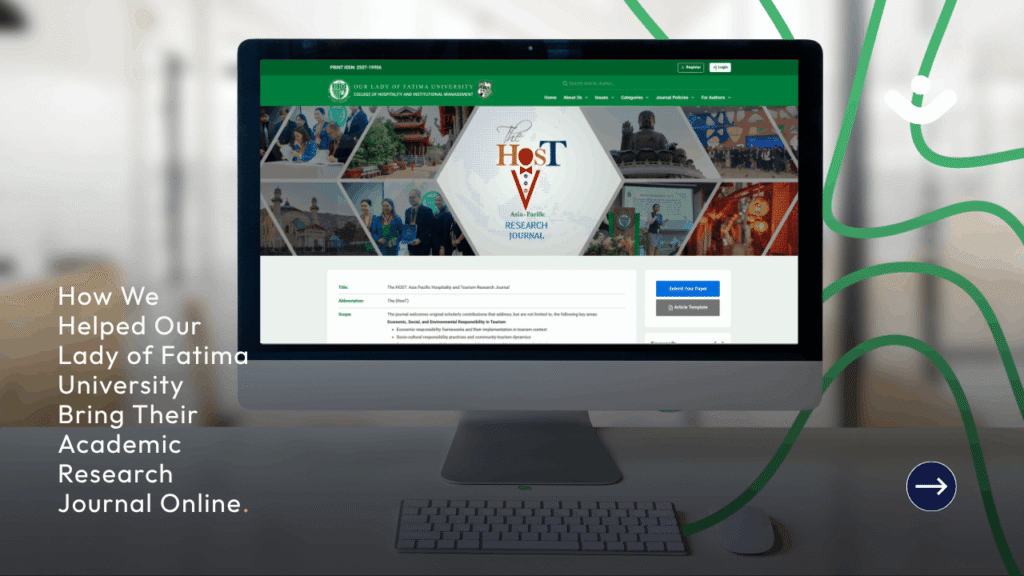
Most academic journals in the Philippines still live in binders. Printed, filed, and largely inaccessible unless you know exactly where to look. That’s a real problem when the research inside them is genuinely valuable.
Our Lady of Fatima University (OLFU) knew this. Their physical journal, The HosT: Asia Pacific Hospitality and Tourism Research Journal, had years of peer-reviewed research on sustainable tourism, responsible hospitality practices, and regional industry development. But without a proper online home, that work wasn’t reaching the researchers, students, and institutions that needed it most.
That’s when they partnered with CliqAlly. Together, we built thehostbyolfu.com, a fully functional online research journal platform that launched in November 2025. Here’s a look at what we built and why it matters for other academic institutions thinking about making the same move.
Why OLFU Needed More Than a Print Journal
Print ISSN numbers identify a journal in its physical form. OLFU’s journal already had one: 2507-19956. But to be indexed in academic databases, to be discoverable through Google Scholar and similar tools, and to be treated as a legitimate digital publication, a journal needs an Online ISSN too.
That was one of the first goals. By building a proper online journal platform, OLFU positioned The HosT to apply for and display its own Online ISSN, giving it equal standing alongside other peer-reviewed digital publications in the Asia-Pacific region.
A website alone wouldn’t have done it. The platform needed the right structure, the right metadata, and all the institutional components that give a journal credibility online. That’s what we focused on building.
What the Platform Does: A Feature-by-Feature Look
A Homepage That Communicates Credibility Immediately
First impressions matter, especially in academic publishing. When a researcher or student lands on the homepage, they need to immediately understand what the journal is, who publishes it, and whether it’s worth their time.
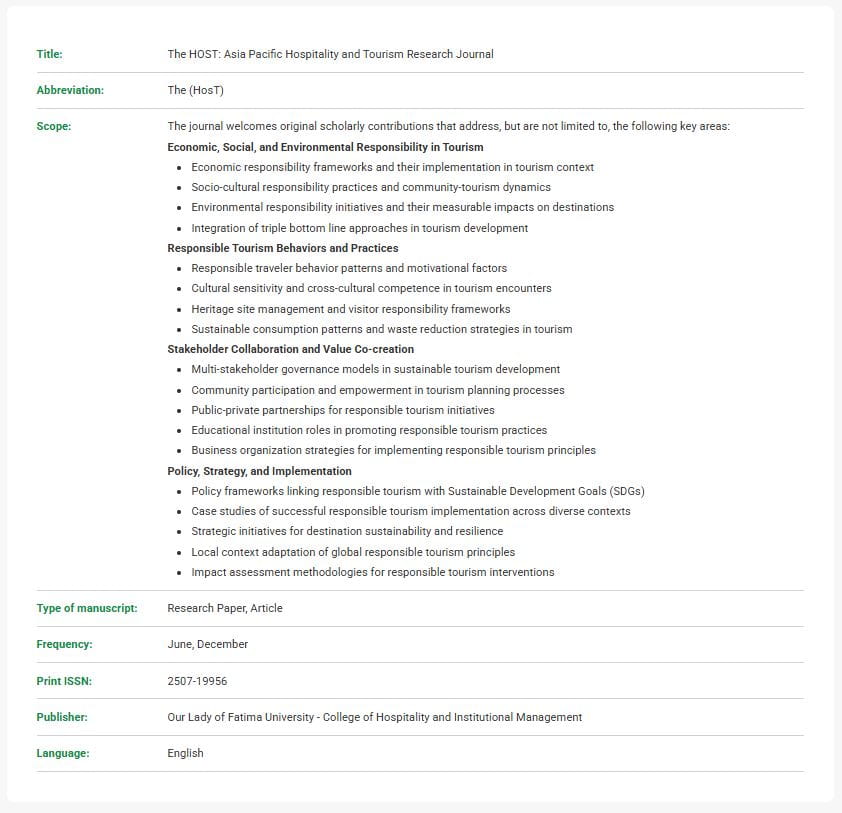
The homepage of The HosT covers all of it. It displays the journal’s full title, abbreviation (The HosT), scope, type of accepted manuscripts (research papers and articles), publication frequency (June and December), Print ISSN, and publisher details. The publisher is OLFU’s College of Hospitality and Institutional Management, and that context matters to anyone evaluating the journal’s credibility.
This isn’t decoration. Every detail on that homepage serves a purpose: communicating that this is a serious, structured, peer-reviewed publication with clear standards.
Current Issue and Accessible Research Papers
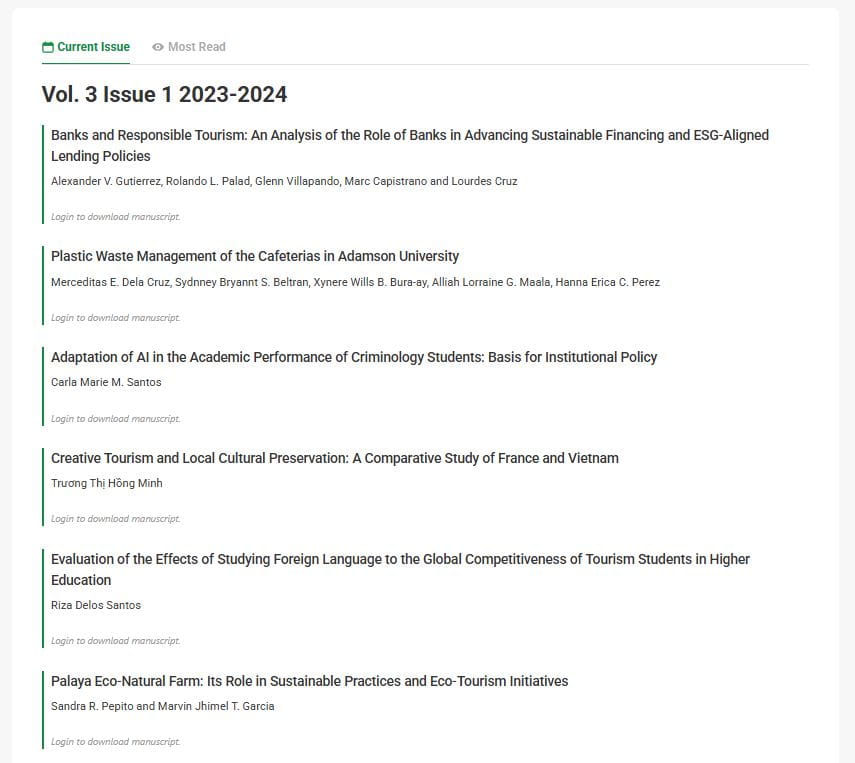
Researchers need to know what’s been published recently. The Current Issue section shows exactly that, presenting the latest volume with each paper listed by title, author, and abstract.
The current issue features work like a study on banks and responsible tourism financing, examining how ESG-aligned lending policies can support sustainable development in the hospitality industry. That’s the kind of practical, policy-relevant research that deserves a wider audience, and the platform makes sure it gets one.
Controlled PDF Downloads for Verified Users
Not every research platform can balance open access with institutional access controls. The HosT does. PDFs of each journal paper are available for download, but access is gated to two groups: enrolled students of OLFU, and external researchers who have gone through a formal access request process.
This protects the intellectual property of the researchers and the institution while still making the work available to those with legitimate academic interest. It’s a model that works, and it’s one we built into the platform from the ground up.
Most Read Research Articles
Visibility drives impact. When a researcher sees that a particular paper is being read frequently, it signals relevance. The Most Read section surfaces those papers automatically, helping visitors find the work that’s generating the most attention within the community.
It’s a small feature that makes a meaningful difference in how researchers navigate the journal.
A Transparent Editorial Team Page
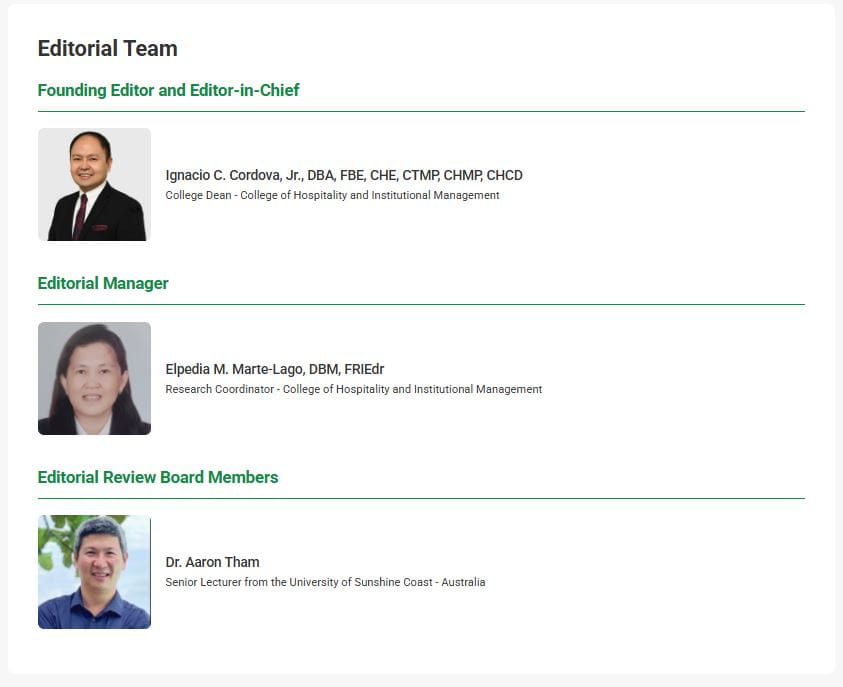
Academic credibility depends on the people behind the journal. The Editorial Team page introduces the scholars and professionals who review, curate, and approve submissions for The HosT. Researchers want to know who’s evaluating their work. Readers want to know who’s vouching for the quality of what they’re reading.
Putting that information front and center isn’t just good design. It’s good science communication.
A Full Archive of Past Research
The Archives section organizes all past issues of The HosT chronologically, making it easy for researchers to trace how topics have evolved over time or find specific studies from earlier volumes.
For a journal that’s been running in print for years, this was a critical part of the project. Digitizing and organizing that back catalogue gives those papers a second life, making them searchable and accessible for the first time.
Individual Research Paper Pages with Citation Support
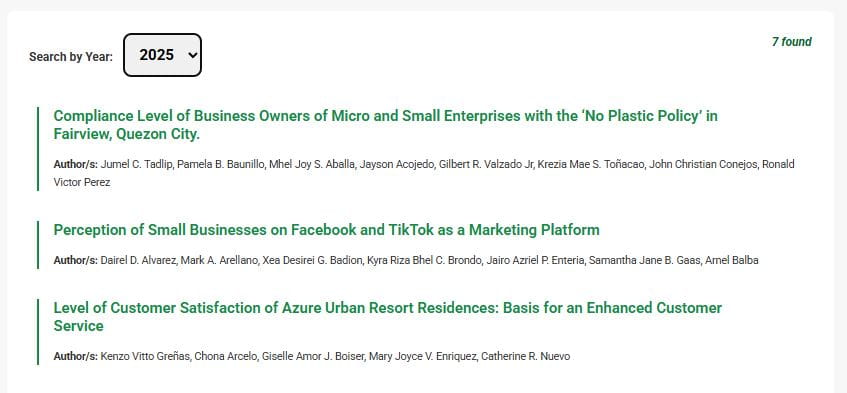
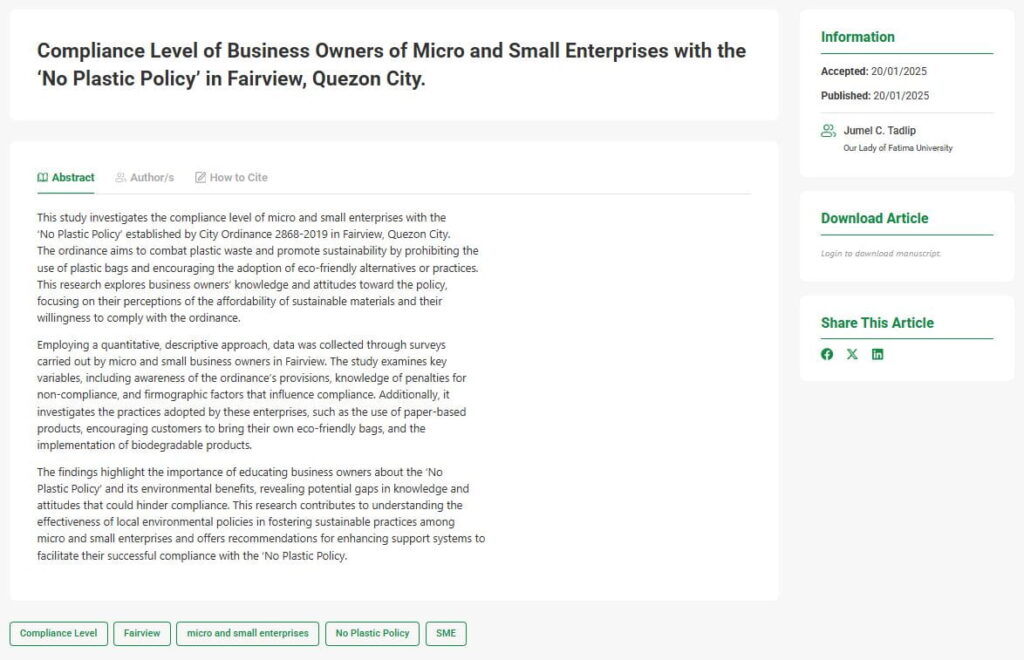
Every research paper on The HosT gets its own dedicated detail page, and those pages do more than just display text. Take this study on business compliance with the No Plastic Policy in Fairview, Quezon City as an example. The page shows the full research title, the complete abstract, and the author names clearly attributed. But the feature that makes it genuinely useful for the academic community is the “How to Cite” section.
Proper citation is how academic work gets credit. If a researcher wants to reference a paper from The HosT in their own study, the platform gives them the correctly formatted citation, ready to copy. They don’t have to manually piece together the journal name, volume, issue, authors, and year. It’s all there, formatted and accurate.
That’s not a minor convenience. In academic writing, citation errors are a real problem, and anything that reduces them makes the journal more reliable as a source. It also makes The HosT more attractive to researchers who want to reference the work, which in turn raises the journal’s visibility and citation count over time.
Clear Submission Guidelines and a Downloadable Article Template
Getting more researchers to submit to The HosT means making the submission process as clear as possible. The platform includes a dedicated Submission Guidelines page that walks authors through exactly what the journal accepts, how to format their work, and what to expect during the review process.
Better yet, the platform offers a downloadable article template. Researchers don’t have to guess at formatting requirements. They can download the template, write to the right specifications, and submit with confidence. That removes friction and signals that the journal values authors’ time.
Search by Keywords and Browse by Category
The HosT includes a keyword search function so researchers can find papers on specific topics quickly. It also organizes content into four clear categories: Economic, Social and Environmental Responsibility in Tourism; Responsible Tourism Behaviours and Practices; Stakeholder Collaboration and Value Co-Creation; and Policy, Strategy and Implementation.
Whether you’re looking for something specific or just exploring what’s been published, the platform gives you more than one way to find it.
Journal Policies That Build Trust
The platform includes a full section on journal policies, covering publication ethics, the publication process, the retraction policy, open access and copyright terms, and plagiarism screening procedures.
These aren’t afterthoughts. They’re the backbone of a journal’s credibility, and they needed to be clearly presented and easy to find. Every policy page on The HosT is structured to be readable and comprehensive, giving both authors and readers the transparency they expect from a serious academic publication.
A Detailed Peer Review Process Page
The peer review process is what separates a credible academic journal from a content aggregator. The dedicated Peer Review Process page explains exactly how submitted manuscripts are evaluated, what criteria reviewers use, and what authors can expect at each stage.
This kind of transparency builds confidence on both sides. Authors know what they’re getting into. Readers know the published work has been rigorously vetted.
Built on WordPress, Elementor Pro, and ACF Pro
Technology choices matter. We built The HosT on WordPress, which gives OLFU full ownership of their platform and the flexibility to manage and update content without relying on a developer for every small change. That’s not a small thing for a university team that publishes twice a year and needs to post new papers, update editorial team profiles, and manage access requests on their own schedule.
For the design layer, we used Elementor Pro. It gave us precise control over the layout and visual structure of every page while keeping the backend manageable for the OLFU team. Combined with Advanced Custom Fields (ACF) Pro, we were able to build custom data structures for journal metadata, research paper entries, author profiles, and issue archives, all cleanly organized and easy to update.
The design itself is minimal and clean by intent. Academic audiences don’t need visual noise. They need to find information quickly and trust that the platform they’re reading is professional. Every layout decision prioritized clarity: generous whitespace, a clear typographic hierarchy, and a navigation structure that makes sense the first time you use it. It looks the way a serious research journal should look. Straightforward, credible, and easy on the eyes.
This stack is also practical for institutions with limited in-house technical resources. WordPress is widely understood. Elementor Pro is visual and intuitive. And because we built the content architecture with ACF Pro, the OLFU team can add new research papers and update journal details without touching a line of code.
What This Means for Other Universities
The HosT platform is a good example of what happens when an institution takes its research seriously enough to invest in the right digital infrastructure. OLFU’s College of Hospitality and Institutional Management now has a journal that can compete for indexing, attract submissions from across the region, and give its students’ work the audience it deserves.
If your institution has a journal sitting in print, or a collection of research that isn’t reaching the people it should, the path forward is the same: a purpose-built platform that handles access control, metadata, peer review transparency, and discoverability all in one place.
That’s exactly what CliqAlly builds. We’ve done it for OLFU, and we can do it for your institution too.
The Research Deserves to Be Read
There’s a lot of valuable academic work that never gets the attention it should because the platform isn’t there to support it. A good research journal website isn’t complicated to describe: it makes the work discoverable, gives authors a reason to submit, gives readers a reason to come back, and gives the institution the credibility it’s earned.
That’s what we built for OLFU. If you’re a university, college, or research institution looking to bring your academic publications online, we’d like to hear from you.
Ready to give your research journal the platform it deserves? Contact CliqAlly to start your project and see what a purpose-built academic web platform can do for your institution.
A business owner types a short description into a text box. Thirty seconds later, they have a fully built website. Logo, homepage, copy, contact form. Done. It almost feels like cheating.
And honestly? That speed is real. AI website builders have gotten remarkably capable, and the argument for using them is easy to make. They’re fast, they’re affordable, and for many early-stage businesses, they’re enough to get online.
But here’s where it gets interesting: speed and “good enough” aren’t the same thing as effective. The websites driving real leads, conversions, and business growth don’t just exist. They’re built with intention. They’re built by people who understand your business, your users, and your goals. AI can assist that process in powerful ways. It can’t replace it entirely.
So before you hand your digital storefront over to an algorithm, here’s what you actually need to know about AI-designed websites: the real benefits, the real gaps, and why a human still needs to be in the room.
What AI Website Builders Actually Get Right
Let’s be clear: dismissing AI as a toy for non-serious businesses would be a mistake. The tools have matured fast.
Speed That Changes the Game
A 10Web report from early 2025 found that businesses using AI during the creation phase reduced initial production time by an average of 70 percent. That’s not a rounding error. For startups validating an idea, service providers who just need a landing page, or teams launching a short-term campaign, that speed is genuinely valuable.
Getting online faster means getting in front of customers faster. For many small businesses, that’s the whole ballgame.
Lower Cost to Launch
Custom web development is expensive. A professionally designed and developed website can run anywhere from tens of thousands to six figures depending on scope. AI builders bring that entry cost down significantly, often to a few hundred dollars a year. For budget-constrained businesses, that’s not a compromise. That’s an opportunity to start building an online presence while resources grow.
Solid Starting Points for Design and Copy
Modern AI builders don’t just slam a template together. Platforms like Wix ADI ask strategic questions about your business type, target audience, and goals before generating a layout. The better ones produce designs that are responsive, clean, and structurally sound right out of the box. That’s a legitimate foundation.
The AI-generated copy won’t be perfect. But having a first draft of every page, even a rough one, saves time compared to starting from a blank screen.
What AI Website Builders Consistently Miss
Here’s where the conversation gets more important, especially for businesses serious about long-term performance.
Is an AI-Built Website Actually Yours?
One of the most common mistakes businesses make is treating a fast website as a finished website. A 2025 study that reviewed 40 small businesses that launched with AI builders found that while 78 percent published within 24 hours, nearly one third had to rebuild their site within three to six months. The AI-generated version lacked scalability and a recognizable brand identity.
That’s a meaningful cost hiding behind a cheap launch.
Does It Reflect Your Brand?
Your website is often the first impression a potential client gets of your business. According to branding data compiled in 2025, 59 percent of customers say AI-generated content hurts brand trust. At the same time, brands with consistent visual identity across platforms see about 33 percent higher recall than those without.
AI builders produce designs based on what works generically. They don’t know your story, your values, or what makes you different from the three competitors in your industry. That gap between “looks like a website” and “feels like your business” is exactly where conversions are lost.
What About SEO and Accessibility?
This is where AI limitations get costly fast.
On the SEO side, AI-generated content tends toward the generic. When produced at volume with little oversight, it can trigger Google’s spam filters and undermine your rankings. Google’s E-E-A-T guidelines, which evaluate Experience, Expertise, Authoritativeness, and Trustworthiness, reward content that demonstrates real knowledge. Thin, templated copy from an AI builder usually doesn’t clear that bar. Beyond content, AI can miss critical technical SEO elements like broken canonical tags, misplaced crawl directives, and poor internal linking structures that affect how search engines index your site.
On the accessibility side, the gap between what AI detects and what full compliance requires is significant. Automated tools often miss context, produce inaccurate labels, or overlook real-world usability barriers, the kind that a screen reader user or someone with cognitive disabilities would encounter daily. Many legal rulings in 2025 have reinforced that manual audits and human testing remain essential for full ADA and WCAG compliance. AI can scan. It can’t substitute for that. Learn more about why accessibility-first web design matters for your business’s long-term digital strategy.
Can You Trust What AI Writes on Your Website?
The Content Accountability Problem
This is the question businesses don’t ask often enough: who is responsible for what the AI puts on your site?
When an AI builder generates your About page, your Services page, or your FAQ section, it’s working from patterns in its training data. Not from your business reality. It can fabricate specifics, misrepresent your services, or produce phrasing that feels hollow and generic. And once that content is live, it’s your name on it.
AI amplifies data quality, as organizations learned in 2025. Models trained on incomplete or inaccurate inputs produce flawed outputs. For a website, those outputs are public-facing and directly tied to your brand’s credibility.
This isn’t an argument against using AI for content. It’s an argument for reviewing, editing, and owning everything that goes live. The AI drafts. You decide.
The Security and Technical Debt You Can’t See
AI-generated code can look functional on the surface while hiding serious problems underneath. Engineers have increasingly flagged what’s been called a “Productivity Paradox” in AI-built sites: code that is messy, unoptimized, and nearly impossible to debug later. When something breaks, and things do break, you’re left troubleshooting code you didn’t write and don’t fully understand.
There’s also a data exposure risk. Some AI builders store your content outside your region, raising compliance concerns depending on your industry. Knowing what’s happening under the hood of your website matters.
How to Use AI Wisely When Building Your Website
So what’s the right approach? It’s not “use AI” or “don’t use AI.” It’s “use AI with clear human accountability at every critical step.”
What AI Should Handle
AI is a strong tool for speed and volume work. Use it to generate first drafts of copy that your team then rewrites in your actual voice. Use it to prototype layouts before committing to a design direction. Use it to run initial scans for accessibility issues, broken links, or missing metadata. It’s a capable assistant for tasks that would otherwise eat up hours of work.
What Humans Must Own
The strategy behind your website can’t be delegated to a tool. Understanding what your users need, what action you want them to take, and how to structure your content to move them toward that action requires judgment. So does understanding your brand voice, your audience, and your competitive position.
Technical SEO, accessibility compliance, security, and long-term performance also require human expertise. These aren’t optional add-ons. They’re the difference between a website that looks like it works and one that actually generates leads. Before you build anything, make sure you understand what your business really needs from a website. AI won’t tell you that.
Review Everything Before It Goes Live
Treat AI output the same way you’d treat a first draft from a junior team member. It might be 70 percent of the way there. It still needs review. Check the facts, edit the tone, test the functionality, and verify that every page reflects your business accurately.
One practical approach: use AI to build fast, then bring in a professional to audit, refine, and optimize before you invest in traffic or promotion. That combination often delivers the best result for the cost.
What Does This Mean for Your Business?
When AI Builders Make Sense
If you’re validating a concept, launching a temporary campaign, or need a basic digital presence on a limited budget, an AI builder is a legitimate option. It gets you online. For businesses exploring how AI is changing the digital landscape for small businesses, these tools represent a real entry point.
The caveat: build with the understanding that this is a starting point, not a destination. If your business grows, and the goal is that it will, your website needs to grow with it.
When You Need More Than AI Can Give
If your website is a core part of how you acquire clients, build credibility, or compete in your industry, the limits of AI builders become genuine risks. Generic design won’t differentiate you. Thin content won’t rank. Inaccessible pages will cost you users and potentially legal exposure.
This is where professional web design and development makes a measurable difference. Not because AI is bad, but because your business deserves a website built around your specific goals. Not a generic template optimized for no one in particular.
The Bottom Line
AI didn’t design this blog post. A human did, with research, judgment, and intent. That same principle applies to your website.
AI is a tool. A fast, genuinely useful one. But a tool is only as good as the person using it. The businesses getting the most from AI-assisted web design are the ones treating it as a starting point with human accountability at every stage, not a finished product that ships on autopilot.
Your website is working for your business 24 hours a day. It deserves that same intentional oversight.
Ready to build a website that actually works for your business? Contact CliqAlly to start your project and see what an accessibility-first, conversion-focused website can do for your growth.

The way people buy condominiums has fundamentally changed. Buyers now rely on digital experiences to evaluate properties, compare options, and make decisions. As a result, a condo development website has evolved into a critical platform for presenting information, building trust, and generating qualified leads.
Before a buyer ever visits your showroom, they’ve already:
- Compared multiple developments
- Checked prices
- Explored amenities
- Evaluated location
If your website fails to provide the right information, you don’t just lose traffic, you lose serious buyers.
So what exactly should a condo development website include in 2026?
Let’s break down the key information your condo website must communicate to attract, engage, and convert.
1. Clear Project Overview
Your project overview is your positioning statement. Within seconds, visitors should understand what your development is and why it matters.
What to include:
- Project name and type (e.g., residential condo, mixed-use)
- Project concept or theme (modern urban living, resort-style, eco-friendly, etc.)
- Target audience (young professionals, families, investors)
- Key highlights (e.g., prime location, smart home features, premium amenities)
- Unique selling proposition (USP)
Why it matters:
Buyers don’t compare properties logically at first, they compare them emotionally and conceptually. A strong overview frames your project as a lifestyle solution, not just a unit for sale.
Pro tip:
Avoid generic lines like “a perfect place to live.” Instead, use specific positioning like:
“A transit-oriented development designed for professionals working in Quezon City.”
2. Unit Types and Floor Plans
This is where interest turns into evaluation. Buyers want to quickly determine if your development fits their needs and budget.
What to include:
- Unit categories (Studio, 1BR, 2BR, etc.)
- Floor area range (sqm)
- Clear floor plans (high-resolution, labeled)
- Key features per unit (balcony, corner unit, smart layout)
- Downloadable versions (PDFs)
Why it matters:
Clarity here reduces confusion and prevents drop-offs. If users can’t easily understand your units, they’ll leave and check another property.
Pro tip:
Make this section visual-first. Let users scan and compare quickly without reading too much text.
3. Pricing and Payment Information
Pricing is one of the biggest friction points, but also one of the strongest conversion drivers.
What to include:
- Starting price or price range
- Estimated monthly payments
- Payment schemes (downpayment terms, installments)
- Financing options (bank financing, in-house)
Why it matters:
Transparency builds trust and filters out unqualified leads. It also saves time for both your team and potential buyers.
Pro tip:
If full transparency isn’t possible, use a lead capture strategy:
- “Get Full Price List”
- “Compute Your Monthly Payment”
4. Amenities and Lifestyle Features
Amenities are no longer just “nice to have”, they are key selling points that define the living experience.
What to include:
- Complete amenity list (pool, gym, co-working space, lounge, etc.)
- Descriptions of each amenity
- High-quality visuals or renders
Why it matters:
Buyers imagine their daily life when browsing this section. The more vivid the experience, the stronger the emotional connection.
Pro tip:
Translate features into benefits:
- Instead of “co-working space” → “A dedicated space for productivity without leaving home”
5. Location and Accessibility
Location plays a direct role in daily convenience, overall lifestyle, and future property value.
What to include:
- Full address
- Interactive map
- Nearby establishments (schools, malls, hospitals, offices)
- Accessibility highlights (major roads, transport options)
Why it matters:
Buyers often decide based on location before anything else. It directly affects their daily routine and long-term property value.
Pro tip:
Use time-based messaging:
- “3 minutes to MRT station”
- “10 minutes to business district”
6. Visuals and Project Gallery
Your visuals are your strongest selling tool.
What to include:
- Exterior renders
- Interior perspectives
- Actual construction photos (if available)
- Virtual tours / walkthrough videos
Why it matters:
People process visuals faster than text. Strong imagery helps buyers emotionally connect and visualize ownership.
Pro tip:
Use realistic, high-quality visuals. Overly “perfect” or generic renders can reduce credibility.
7. Developer Information
Trust is a major factor in real estate decisions, especially for pre-selling developments.
What to include:
- Company background
- Years of experience
- Past projects
- Awards or recognitions
Why it matters:
Buyers want assurance that the developer is credible and capable of delivering the project on time and as promised.
Pro tip:
Highlight track record over claims. Real examples build stronger trust than marketing statements.
8. FAQs (Frequently Asked Questions)
FAQs reduce hesitation and remove barriers in the decision-making process.
What to include:
- Buying process
- Reservation fees
- Payment terms
- Financing options
- Turnover timeline
Why it matters:
This section saves time for both buyers and your sales team while improving user experience.
Pro tip:
Use FAQs to address common objections, not just basic questions.
9. Downloadable Resources
Some buyers want detailed information they can review offline or share with others.
What to include:
- Project brochure
- Floor plans
- Fact sheets
- Payment details
Why it matters:
Downloadable content signals professionalism and helps move buyers further down the funnel.
Pro tip:
Use form-gated downloads to generate leads while offering value. Tell users exactly what they will get before they submit the form. For example: “Get the complete price list and payment breakdown instantly.”
Clarity increases conversions because users know the value upfront.
10. Trust Signals and Social Proof
Buying a condo is a high-risk decision, so buyers need reassurance.
What to include:
- Testimonials (if available)
- Partner brands or contractors
- Construction updates
- Media features (if any)
Why it matters:
Social proof reduces perceived risk and increases confidence in your project.
Pro tip:
Even small trust signals (logos, certifications) can significantly boost conversions.
11. Clear Contact and Inquiry Options
This is where everything leads. If users are ready but can’t easily contact you, you lose the sale.
What to include:
- Inquiry form (simple and fast)
- Phone number (click-to-call)
- Email address
- Sales office location
- “Schedule a Viewing” CTA
Why it matters:
Convenience drives conversions. The easier it is to reach you, the more inquiries you’ll get.
Pro tip:
- Use sticky CTA buttons (e.g., “Inquire Now”)
- Place CTAs across all pages—not just at the bottom
Final Insight
A successful condo development website doesn’t overwhelm users with information—it guides them step-by-step:
Discover → Explore → Evaluate → Inquire
When your website delivers the right information at the right time, it becomes more than a marketing tool, it becomes your most effective sales channel.
Get in touch with us today and let’s build a website that works as hard as you do.
If you’re a small business owner, you’ve probably heard a lot about AI lately. It might sound like something only big tech companies can afford or use, but that’s no longer true.
AI is quietly reshaping how websites work, how customers interact with businesses, and how small brands compete online. The best part is you don’t need a massive budget or a technical team to start using it.
Let’s break down what’s actually happening and how you can take advantage of it today.
AI is Making Websites Smarter, Not Just Prettier
Before, a “good website” meant clean design, fast loading, and mobile responsiveness. Those still matter, but now there’s a new layer.
Websites are becoming smarter.
Instead of showing the same content to everyone, AI allows your website to adjust based on user behavior. It can recommend products, personalize messages, and guide visitors toward taking action.
Think of it like having a digital assistant that understands your customers while they browse.
For small businesses, this means you no longer have to guess what your visitors want. Your website can help you respond in real time.
Customer Support is Now Instant (Even Without Hiring More People)
One of the biggest changes AI brings is in customer support.
Before, answering inquiries meant being online all the time or hiring staff. Now, AI chatbots can handle common questions instantly. They can respond to FAQs, guide users through your services, and even help with bookings or purchases.
This is especially powerful for small businesses because it allows you to look responsive and professional without increasing your overhead.
More importantly, customers today expect fast replies. If they don’t get them, they leave.
AI helps you stay available even when you’re not.
Content Creation is Faster (But Still Needs Strategy)
AI tools can now help generate website content, from product descriptions to blog posts. This speeds up the process significantly, especially if you’re managing your site on your own.
But here’s the reality: AI is a tool, not a replacement for strategy.
You still need to guide the messaging. You still need to understand your audience. The businesses that win are the ones that combine AI efficiency with human insight.
For example, instead of writing everything from scratch, you can use AI to create a draft, then refine it to match your brand voice.
This saves time while keeping your content authentic.
SEO is Becoming More Competitive (And More Opportunity-Driven)
AI is also changing how search engines work. Platforms are getting better at understanding intent, not just keywords.
That means small businesses have a real opportunity.
You don’t need to compete by publishing hundreds of articles. You can focus on creating helpful, relevant content that directly answers your customers’ questions.
AI can help you:
- Generate topic ideas based on what people are searching
- Optimize your content structure
- Improve readability and clarity
If used correctly, AI can help you compete with bigger brands in search results.
Accessibility is Finally Getting the Attention It Deserves
This is something we care deeply about at CliqAlly.
AI is making it easier to build websites that are accessible to everyone, including people with disabilities. From automated image descriptions to voice navigation and smart contrast adjustments, AI can enhance usability in ways that were harder to implement before.
For small businesses, this is not just about compliance. It’s about reaching more people and creating a better experience for all users.
An accessible website is no longer optional. It’s becoming a standard.
Personalization is the New Competitive Advantage
Imagine a visitor landing on your website and seeing content that feels tailored specifically for them.
AI makes that possible.
It can track behavior such as pages visited, time spent, and actions taken, then adjust what the user sees. This could be showing relevant services, highlighting specific offers, or guiding them toward a decision.
For small businesses, this levels the playing field. You can now offer experiences that feel just as refined as larger companies.
How You Can Start Using AI Today
You don’t need to overhaul your entire website overnight. Start small and build from there.
Here are a few practical ways to begin:
First, add an AI chatbot to your website to handle basic inquiries. This alone can improve user experience significantly.
Second, use AI tools to help with content creation, whether it’s blog posts, landing pages, or product descriptions.
Third, explore AI-powered SEO tools to refine your content strategy and improve visibility.
Fourth, audit your website for accessibility and look for AI tools that can help enhance usability.
Finally, pay attention to your data. AI works best when you understand your users. Look at how visitors interact with your site and use that insight to improve.
Final Thoughts
AI is not here to replace small businesses. It’s here to empower them.
The gap between small and large companies is shrinking because tools are becoming more accessible. What matters now is how quickly you adapt and how intentionally you use these tools.
If you approach AI as a partner rather than a shortcut, it can help you create better websites, better experiences, and ultimately, better results.
And if you’re not sure where to start, that’s exactly where we come in.
At CliqAlly, we help businesses build smarter, more accessible websites that are ready for what’s next.
Get in touch with us today and let’s build a website that works as hard as you do.
Whether you’re a startup, a local shop, or a growing service provider, your website often serves as the first impression of your business.
But here’s the truth: jumping straight into building a website without proper planning can lead to wasted time, money, and missed opportunities.
Before you start designing or hiring a developer, here are the key things every small business needs to know.
Define Your Website’s Purpose
Before anything else, you need clarity on why you’re building a website.
Many small businesses make the mistake of saying, “We just need a website,” without defining what success actually looks like. This leads to cluttered pages, unnecessary features, and weak results.
Your website should have a primary goal, such as:
- Generating leads (e.g., inquiries, bookings)
- Selling products (eCommerce)
- Showcasing services or portfolio
- Building credibility and brand presence
For example, a service-based business should focus on strong calls-to-action like “Get a Quote” or “Book a Consultation,” while an online store should prioritize product pages and a seamless checkout experience.
When your purpose is clear, every design decision becomes easier—and more effective.
Know Your Target Audience
A common mistake many businesses make is designing a website based on personal preference rather than actual user needs. While it is natural to want a site that reflects your style, your website should ultimately be built for your customers, not for you.
To create an effective website, you need a clear understanding of your ideal customer. This goes beyond basic demographics like age. It includes how they behave online, what problems they are trying to solve, what motivates their decisions, and how comfortable they are with technology. These insights shape everything from your layout and messaging to your calls to action.
For example, if your target audience consists of corporate clients, they are more likely to expect a clean and structured design with professional language, clear navigation, and straightforward information. They value efficiency and credibility, so your website should immediately communicate trust and expertise. On the other hand, if you are targeting a younger audience, they may be more drawn to visually engaging designs, interactive elements, and a more conversational tone. They tend to explore more and respond to creativity and personality.
Understanding your audience also helps you decide what content to prioritize. If your users are busy and goal oriented, they will want quick access to key information such as pricing, services, or contact options. If they are more exploratory, they may appreciate storytelling, visuals, and detailed explanations. Even small decisions like button placement, font size, or how much text to include can significantly impact how users interact with your site.
In addition, knowing your audience allows you to reduce friction. When your website aligns with user expectations, visitors do not have to think too hard about what to do next. Navigation becomes intuitive, messaging becomes clearer, and the overall experience feels seamless. This increases the likelihood that visitors will stay longer, trust your brand, and take action.
In short, the more deeply you understand your audience, the more intentional your website becomes. Instead of guessing what might work, you are creating an experience that directly speaks to the people you want to reach. That is what makes a website truly effective.
Plan Your Content Early
One of the biggest reasons website projects get delayed is simple. Content is not ready.
A lot of businesses focus on design first, thinking the words and images can come later. In reality, content shapes the entire website. It tells your designer what sections to create, what to highlight, and how users will move through your pages.
Instead, prepare your content early, including:
- Clear and compelling homepage messaging
- Detailed service or product descriptions
- A strong “About Us” page that builds trust
- High-quality images, videos, or testimonials
Good content does more than inform—it persuades.
You do not need perfect content right away, but you do need clarity. Even a rough draft is better than starting from scratch during development. It will save you time, reduce revisions, and make the entire process smoother.
Choose the Right Platform
Choosing a platform is not just a technical decision. It affects how your website grows with your business.
Some platforms are easy to start with but become limiting later on. Others take more effort upfront but give you more flexibility in the long run. This is where many small businesses struggle. They choose what is easiest today without thinking about what they might need tomorrow.
If you are planning to scale, add features, improve SEO, or customize your site over time, you need a platform that can support that growth. Think about things like adding booking systems, integrating marketing tools, or expanding into eCommerce. Not all platforms handle these well.
It helps to ask yourself a simple question. Will this still work for me one or two years from now? If the answer is uncertain, it might be worth investing in something more flexible from the start.
Don’t Ignore SEO (Search Engine Optimization)
You can have the most beautiful website in the world, but if no one can find it, it will not do much for your business.
SEO is what helps your website show up when people search online. It connects your business to people who are already looking for what you offer.
Instead of thinking of SEO as something technical, think of it as understanding how your customers search. What words do they use? What questions do they ask? Your website should reflect that.
This shows up in simple ways. Your page titles should be clear. Your content should answer real questions. Your headings should guide readers through your page naturally. Over time, creating helpful content like blogs can also bring in consistent traffic.
SEO takes time, but it is one of the most reliable ways to grow your online presence without relying entirely on ads.
Prioritize Website Speed
We have all experienced opening a slow website and immediately leaving. Your visitors are no different.
Speed plays a big role in how people perceive your business. A fast website feels professional and reliable. A slow one feels frustrating and outdated.
There are many small things that affect speed. Large images, too many plugins, and poor hosting are some of the common causes. These may seem minor, but together they can slow your site down significantly.
The goal is to make your website feel instant. When users click something, it should respond quickly. When pages load smoothly, people are more likely to stay and continue exploring.
Make It Accessible
Accessibility is often overlooked, but it is something every business should seriously consider.
At its core, accessibility means making sure your website can be used by as many people as possible, including those with disabilities. This could be someone who has difficulty seeing small text, someone who relies on a keyboard to navigate, or someone who uses a screen reader.
Simple adjustments can already make a big difference. Clear fonts, good color contrast, and a logical structure help users understand your content more easily. It also improves the experience for everyone, not just those with specific needs.
According to the World Health Organization, over one billion people worldwide live with some form of disability. That is a significant portion of the global population that may struggle to access websites that are not designed with inclusivity in mind. Ignoring accessibility means potentially excluding a large group of users from interacting with your business.
In addition, the World Wide Web Consortium, the organization behind web standards, provides guidelines through the Web Content Accessibility Guidelines (WCAG). These guidelines outline best practices such as ensuring proper contrast, making content navigable by keyboard, and providing text alternatives for images.
There is also growing awareness around accessibility laws in different countries. If you are working with international clients, especially in markets like the United States, accessibility can directly impact compliance and credibility.
Making your website accessible is not just about following rules. It shows that your business values inclusivity and is committed to creating a better experience for all users.
Set a Realistic Budget
Building a website is an investment, and like any investment, it requires planning.
It is tempting to go for the cheapest option available, especially when you are just starting out. But a low-cost website that does not perform well can end up costing you more in the long run.
Think about what you actually need. A simple website may work for now, but if you plan to grow, you might need additional features later. It is better to be prepared than to rebuild everything from scratch.
Your budget should consider not just the initial build, but also things like hosting, tools, updates, and possible improvements. A well-built website should support your business, not hold it back.
Plan for Maintenance
A website is not something you build once and forget.
Over time, things need to be updated. Plugins need upgrades, content needs refreshing, and occasional issues need fixing. If these are ignored, your website can become slow, outdated, or even vulnerable to security risks.
Think of your website like a physical store. You would not leave it unattended for months without cleaning or checking on it. The same mindset applies here.
Regular maintenance keeps your website running smoothly and ensures that visitors always have a good experience. It also gives you the chance to improve things over time as your business grows.
Get in touch with us today and let’s build a website that works as hard as you do.
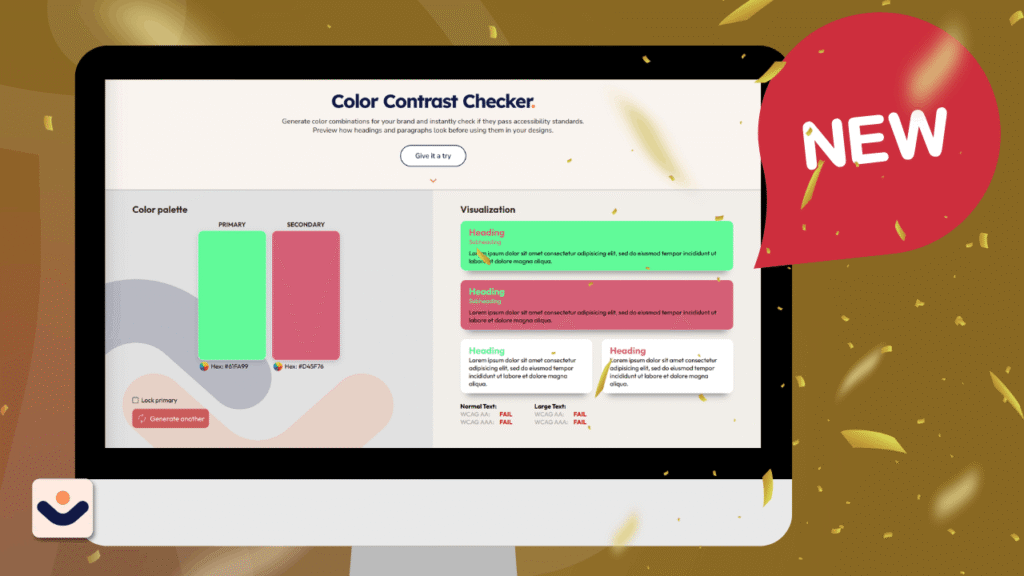
At CliqAlly, we believe every website should be usable by everyone. That’s why we created a simple yet powerful tool: the CliqAlly Contrast Checker—built to help designers, developers, and business owners ensure their color choices are readable, inclusive, and compliant.
Why Color Contrast Matters
Color contrast plays a huge role in how users experience your website.
If your text blends into the background, users may struggle to read your content—especially those with visual impairments or color blindness. In fact, poor contrast is one of the most common accessibility issues found on websites.
According to WCAG guidelines:
- Normal text should have at least a 4.5:1 contrast ratio
- Large text should have at least a 3:1 contrast ratio
Failing to meet these standards doesn’t just affect accessibility—it can also impact user experience, engagement, and even conversions.
What is the CliqAlly Contrast Checker?
The CliqAlly Contrast Checker is a free online tool that lets you instantly test color combinations for accessibility.
Simply choose your text color and background color, and the tool will:
- Calculate the contrast ratio
- Show whether it passes or fails
- Evaluate both WCAG AA and AAA standards
- Provide results for normal text and large text
No complicated setup. No guesswork. Just clear results.
Built for Simplicity and Speed
Many contrast tools exist, but we focused on making ours:
- Beginner-friendly – anyone can use it, even non-designers
- Fast and intuitive – instant feedback as you adjust colors
- Practical – designed for real-world use during design and development
Instead of digging through guidelines or doing manual calculations, you get immediate answers—so you can make better design decisions faster.
Who Should Use This Tool?
The CliqAlly Contrast Checker is useful for:
Designers
Validate your color palettes before finalizing designs.
Developers
Ensure your UI meets accessibility standards during development.
Business Owners
Check if your website is readable and inclusive for all users.
Content Creators
Make sure your visuals and text are easy to consume across devices.
Why This Tool Matters for Inclusivity
Accessibility isn’t just a technical requirement—it’s a responsibility.
Millions of users experience low vision, color blindness, or other visual challenges. Proper contrast ensures they can:
- Read your content clearly
- Navigate your website
- Engage with your brand without barriers
Better contrast doesn’t just help users with disabilities—it improves readability for everyone, especially in bright environments or on mobile screens.
More Than Compliance—It’s Better UX
While meeting WCAG standards is important for legal compliance, the real value goes beyond that.
Good contrast leads to:
- Better readability
- Lower bounce rates
- Higher engagement
- Improved user trust
In short: accessible design is good design.
How to Use the CliqAlly Contrast Checker
Using the CliqAlly Contrast Checker is simple and interactive—you don’t need any technical knowledge to get started.
Here’s how you can make the most out of it:
1. Generate Your Colors
Start by generating two colors:
- Primary color (usually your text color)
- Secondary color (your background)
You can either manually pick colors or let the tool generate combinations for you instantly.
2. Preview in Real-Time
As soon as your colors are selected, you’ll see text samples in the visualization column.
This gives you a real-world preview of how your content will look—not just numbers, but actual readability.
3. Lock a Color You Like
Found a primary color you want to keep?
You can lock the primary color and continue generating different secondary colors. This is perfect if:
- You already have a brand color
- You want to explore safe background combinations
4. Generate Better Matches
Keep generating until you find a combination that looks good and passes accessibility standards.
This removes the guesswork and helps you discover combinations you might not have considered.
5. Check Accessibility Results
For every combination, the tool automatically shows:
- Pass or Fail
- WCAG AA and AAA compliance
- Results for both:
- Normal text
- Large text
Try It Yourself
Ready to test your colors? Visit the CliqAlly Contrast Checker and start building more accessible designs today.
Get in touch with us today and let’s build a website that works as hard as you do.
When you first install WordPress, your website is like a blank canvas — beautiful in its simplicity, but missing a few essential tools that turn it into a functional, secure, and optimized website.
That’s where plugins come in.
Plugins are add-ons that expand WordPress’s capabilities. Whether you want to optimize your site for search engines, secure it from hackers, or add a contact form, there’s a plugin for it.
But here’s the catch: there are over 60,000 free plugins available in the WordPress repository. Not all of them are worth installing, and some can even slow down your site or cause conflicts.
To help you get started right, we’ve curated a list of the Top 10 Free WordPress Plugins that every website should have in 2025, whether you’re running a small business site, a portfolio, or a blog.
1. Yoast SEO
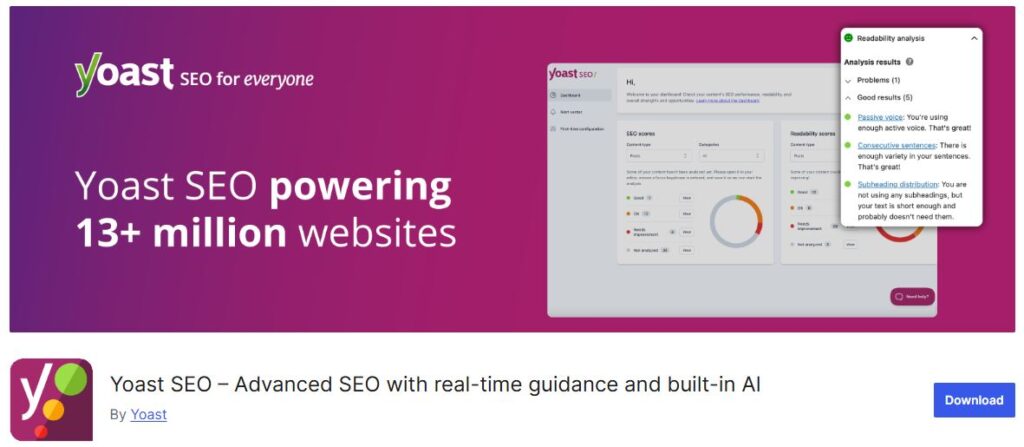
Purpose: Search Engine Optimization (SEO)
Active Installations: 5+ million
If you want people to actually find your website, SEO is non-negotiable — and Yoast SEO remains the gold standard for optimizing WordPress sites.
Why You Need It:
Helps you optimize pages and posts for your target keywords.
Offers readability checks to ensure content is easy to digest.
Automatically handles meta titles, descriptions, and canonical URLs.
Creates an XML sitemap so search engines can crawl your site faster.
Pro Tip:
Yoast’s red-yellow-green “traffic light” system makes SEO simple even for beginners — just follow its color-coded recommendations.
Alternatives: Rank Math, All-in-One SEO
2. Contact Form 7

Purpose: Simple contact and feedback forms
Active Installations: 5+ million
Every website needs a way for visitors to reach you — and Contact Form 7 has been the go-to solution for years. It’s lightweight, flexible, and works out of the box.
Why You Need It:
Allows you to create unlimited forms with basic HTML tags.
Integrates easily with reCAPTCHA to prevent spam submissions.
Works with popular extensions for database storage and file uploads.
Fully free and open-source, with strong community support.
Pro Tip:
You can extend Contact Form 7’s features using companion plugins like Flamingo (to store messages in your dashboard) or CF7 Conditional Fields (for dynamic forms).
Alternatives: WPForms Lite, Formidable Forms
3. Elementor
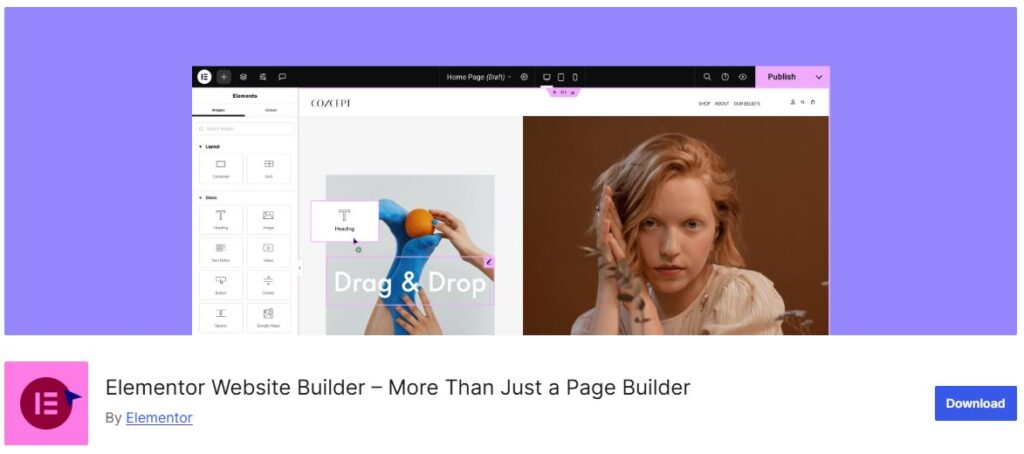
Purpose: Drag-and-drop page builder
Active Installations: 5+ million
For non-developers, designing a beautiful WordPress website can be intimidating. Elementor makes it easy with a visual editor that lets you drag, drop, and customize everything in real time.
Why You Need It:
Offers a front-end live editing experience — no coding required.
Includes pre-designed templates and blocks for faster design.
Works with almost any theme.
Pro Tip:
You can create entire landing pages using the free version. For advanced features like theme building or motion effects, consider the paid plan later.
Alternatives: Beaver Builder, Bricks Builder (paid)
4. Duplicate Page
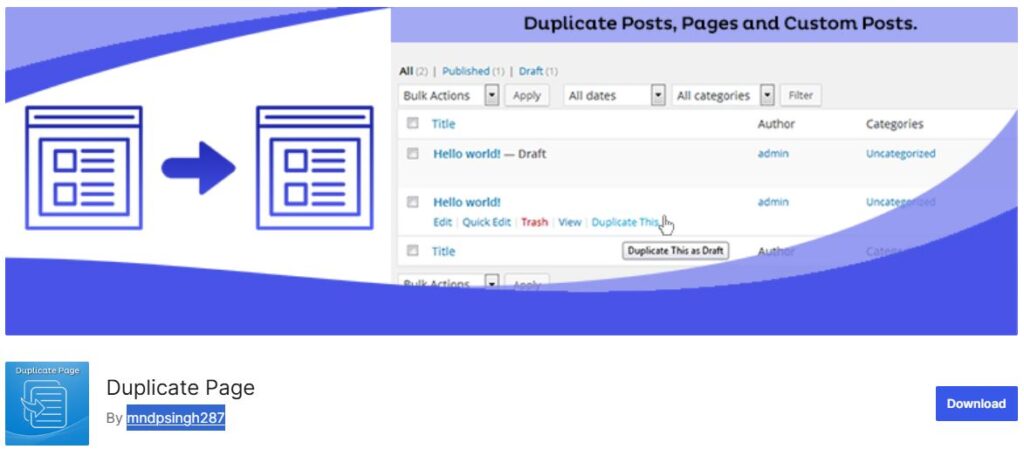
Purpose: Quickly clone pages, posts, or custom post types
Active Installations: 4+ million
When you’re working on multiple similar layouts or need to create content variations, Duplicate Page saves you tons of time. Instead of rebuilding a page from scratch, it lets you duplicate any post or page with just one click — keeping all your content, formatting, and settings intact.
Why You Need It:
Instantly clone pages, posts, or custom templates for faster workflow.
Maintains SEO settings, featured images, and formatting.
Perfect for designers, developers, and content editors managing large sites.
Pro Tip:
Use Duplicate Page to create test versions of important pages before publishing updates. You can safely make changes and review them without affecting the live version.
Alternatives: Yoast Duplicate Post, Post Duplicator
5. Redirection

Purpose: Manage 301 redirects and fix broken links
Active Installations: 2+ million
Broken links can hurt your SEO and confuse users. The Redirection plugin makes it simple to manage all your redirects in one place.
Why You Need It:
Easily create 301 redirects for changed or deleted URLs.
Tracks 404 errors so you can fix them quickly.
Prevents users from landing on dead pages.
Pro Tip:
Use Redirection after redesigning your website or changing permalink structures to preserve your SEO rankings.
Alternatives: Simple 301 Redirects
6. LiteSpeed Cache
Purpose: Quickly clone pages, posts, or custom post types
Active Installations: 4+ million
When you’re working on multiple similar layouts or need to create content variations, Duplicate Page saves you tons of time. Instead of rebuilding a page from scratch, it lets you duplicate any post or page with just one click — keeping all your content, formatting, and settings intact.
Why You Need It:
Instantly clone pages, posts, or custom templates for faster workflow.
Maintains SEO settings, featured images, and formatting.
Perfect for designers, developers, and content editors managing large sites.
Pro Tip:
Use Duplicate Page to create test versions of important pages before publishing updates. You can safely make changes and review them without affecting the live version.
Alternatives: Yoast Duplicate Post, Post Duplicator
7. Smush
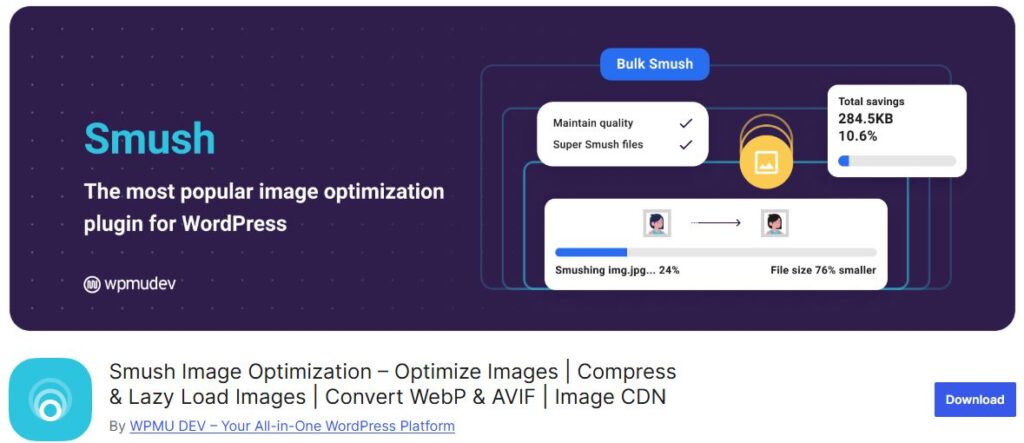
Purpose: Image optimization
Active Installations: 1+ million
High-quality images can make your site beautiful — but they can also make it slow. Smush compresses your images without reducing quality.
Why You Need It:
Automatically compresses images on upload.
Offers lazy loading to improve page speed.
Supports bulk optimization for existing images.
Pro Tip:
After installing, run the bulk smush feature to optimize all current media in your library.
Alternatives: EWWW Image Optimizer, ShortPixel
8. Solid Security
Purpose: Protect your WordPress site from hacks and unauthorized access
Active Installations: 1+ million
Website security isn’t optional — it’s essential. Solid Security (formerly iThemes Security) provides a powerful set of tools to safeguard your WordPress site against common threats like brute-force attacks, malware, and suspicious logins.
Why You Need It:
Limits login attempts to block automated attacks.
Detects and repairs common WordPress vulnerabilities.
Enforces strong passwords and two-factor authentication.
Monitors file changes and keeps an activity log for transparency.
Pro Tip:
After installing Solid Security, enable Two-Factor Authentication (2FA) and File Change Detection — two features that drastically reduce the risk of unauthorized access.
Alternatives: Wordfence Security, All-In-One WP Security & Firewall
9. Contact Form 7 Database Addon
Purpose: Save Contact Form 7 submissions directly to your WordPress database
Active Installations: 300,000+
While Contact Form 7 handles form submissions beautifully, it doesn’t store messages by default. Contact Form CFDB7 fills that gap — automatically saving all submissions so you never lose important inquiries, even if email delivery fails.
Why You Need It:
Automatically saves all Contact Form 7 submissions in your WordPress dashboard.
Export entries to CSV or Excel for reporting and backups.
View, search, and manage form data directly within WordPress.
Protects against lost leads due to email issues.
Pro Tip:
Combine Contact Form CFDB7 with Akismet to reduce spam entries, and schedule regular exports to keep your lead database organized.
Alternatives: Flamingo, WPForms Lite (includes built-in entry storage)
10. Smart Slider 3
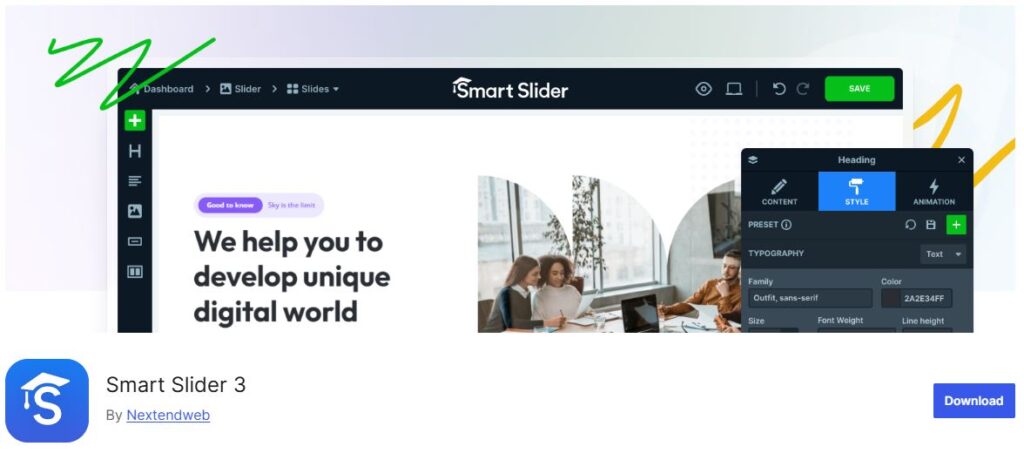
Purpose: Create responsive, animated sliders and hero sections easily
Active Installations: 1+ million
A visually engaging website keeps visitors hooked — and Smart Slider 3 helps you do just that. It’s one of the most powerful free slider plugins for WordPress, allowing you to design stunning sliders, carousels, and hero headers without touching a line of code.
Why You Need It:
Intuitive drag-and-drop interface for building sliders visually.
Fully responsive and touch-friendly layouts.
Add animations, layers, and dynamic content easily.
Works seamlessly with popular page builders like Elementor and Gutenberg.
Pro Tip:
Use Smart Slider 3 to design an eye-catching hero section for your homepage. Keep text concise, use high-quality images, and add subtle animations for a professional, modern feel.
Alternatives: MetaSlider, Slider by 10Web
Whether you’re managing your own website or preparing to launch your business online, these plugins provide a solid foundation — all for free.
At CliqAlly, we specialize in building accessible, high-performing WordPress websites that are ready to grow with your business. If you’d rather focus on your brand while experts handle the technical setup, our team can help you choose, configure, and maintain the right tools for your site.
Get in touch with us today and let’s build a website that works as hard as you do.

Many businesses think of a website as something you “have to have,” like a digital business card. The truth is, your website is one of the most powerful tools for attracting customers, building trust, and driving revenue. A high-quality website is not a cost—it’s an investment that can deliver measurable returns over time.
First Impressions Count
When someone discovers your business, the website is often the very first interaction they have with you. Within seconds, visitors form an opinion about whether they want to trust you or move on to a competitor. A modern, professional design sends a message of credibility and competence. On the other hand, an outdated, slow, or confusing site can cause potential customers to leave before they even learn about your services. By making a strong first impression, a high-quality website increases your chances of capturing interest and converting visitors into paying clients.
Better User Experience Leads to More Conversions
A well-built website is designed with the user journey in mind. Clear navigation, fast-loading pages, and mobile-friendly layouts all play a role in keeping visitors engaged. When people can quickly find information about your services, pricing, or contact details, they are less likely to get frustrated and leave. Instead, they are more likely to take the next step—whether that’s filling out a form, scheduling a consultation, or making a purchase. A smooth, seamless user experience directly translates into higher conversion rates, which means more business for you.
SEO Boost for Long-Term Growth
Search engines like Google reward websites that are structured well, load quickly, and deliver value to users. A professionally developed website is built with SEO best practices in mind, from optimized page titles and headings to clean code and mobile responsiveness. Over time, this helps your site climb the search rankings and reach a larger audience organically. Unlike paid ads, which stop bringing traffic as soon as you stop spending, SEO provides long-term visibility. A high-quality website gives you a strong foundation to capture search traffic and grow your business consistently.
Strong Brand Image and Trust
Your website is a direct reflection of your brand. If it looks professional, modern, and easy to use, visitors will associate those qualities with your business. This is especially important for industries where trust and credibility are key, such as law firms, accounting practices, healthcare, and consulting. A polished website shows that you care about details, that you are reliable, and that you take your clients seriously. Building this kind of trust online can make the difference between someone choosing you or going to a competitor.
Higher Return Over Time
A cheap website may seem appealing at first because of the low cost, but it often ends up being more expensive in the long run. Poor design can hurt your SEO rankings, slow load times can frustrate users, and outdated layouts can make your brand look unprofessional. All of these issues lead to lost opportunities and revenue. Eventually, you’ll have to pay for fixes or a complete redesign. By investing in a high-quality website from the start, you avoid those pitfalls. More importantly, a strong website works like a 24/7 salesperson—it attracts visitors, converts them into leads, and keeps generating value year after year. The long-term return easily outweighs the initial investment.
Key Takeaways on ROI
Here’s how a high-quality website delivers measurable returns:
Stronger first impressions that attract and keep potential clients engaged
Improved user experience that makes it easy for visitors to take action
Better SEO performance that increases organic visibility and reduces reliance on ads
Enhanced brand credibility that builds trust and authority in your industry
Long-term value that saves costs on fixes and drives continuous growth
Final Thoughts
Investing in a high-quality website is not about spending more, it is about earning more. The right website does more than look good—it works as a powerful business tool that attracts clients, builds trust, and drives revenue. If your current site is not delivering these results, it may be time to see your website as an investment rather than just another business expense.
At CliqAlly, we create websites that combine professional design, strong SEO foundations, and built-in accessibility. Our goal is to help your business see real returns from your online presence. Let’s talk about how we can build a website that works as hard as you do.
Get in touch with us today and let’s build a website that works as hard as you do.

A professional website is more than just an online presence. It serves as the foundation of credibility, trust, and client acquisition. For service-based professionals like lawyers, accountants, and consultants, the website often creates the first impression for potential clients. That is why it needs to communicate professionalism, clarity, and reliability while also guiding visitors toward taking action.
Why a Strong Website Matters for Professional Services
Clients looking for professional services are not only searching for expertise. They are also looking for someone they can trust. A well-structured website assures visitors of your competence, experience, and reliability. Without this, even highly skilled professionals risk losing potential clients to competitors who present themselves more effectively online.
Best Website Practices to Follow
1. Clear Messaging and Branding
Your value proposition should be clear within seconds. Avoid jargon and focus on client needs—what problems you solve and how you bring value.
2. Professional, Clean Design
A clutter-free and polished layout signals credibility. Neutral colors, high-quality images, and consistent branding are essential in building trust.
3. Easy Navigation
Structure your website logically. Key sections like “About Us,” “Services,” and “Contact” should be easy to find, with no more than a few clicks from the homepage.
4. Showcase Expertise
Add case studies, credentials, certifications, or client testimonials. For lawyers, highlight areas of practice. For accountants, provide service packages. For consultants, share thought leadership blogs.
5. Mobile-Friendly and Fast Loading
With most clients searching on mobile devices, responsive design is a must. A slow or poorly formatted site can drive potential clients away.
6. Clear Calls to Action (CTAs)
Every page should encourage the next step, whether it is scheduling a consultation, filling out a contact form, or calling your office.
7. Compliance and Accessibility
Professional services websites should be ADA-compliant and accessible to all users. This not only broadens your reach but also prevents legal and reputational risks.
8. SEO and Local Optimization
Clients often search for services nearby. Optimize your site for local SEO by including your city, region, or practice area in titles, headings, and content.
9. Content That Builds Trust
Publish informative blogs, FAQs, or guides to answer common client questions. Educational content builds authority and keeps visitors engaged.
10. Secure and Private
Since professional services often handle sensitive information, ensure your site uses HTTPS encryption and communicates your commitment to data privacy.
Final Thoughts
For professional services like law firms, accounting practices, and consulting businesses, a well-built website is a critical tool for growth. By combining professional design with clear messaging, strong content, and accessibility, your website can become a client-generating asset that works around the clock.
Get in touch with us today and let’s build a website that works as hard as you do.